
Koppel je AI
Spaicely werkt via je eigen AI. Kies welke je gebruikt en volg de stappen. Een account heb je nog niet nodig: dat maak je onderweg aan.
Je koppelt ChatGPT, uitleg in het Engels
Andere AI kiezen
- Claude claude.ai en de desktop-app
- ChatGPT chatgpt.com of de ChatGPT-app
- Codex in de Codex-app
- Gemini gemini.google.com
- Mistral chat.mistral.ai, voorheen Le Chat
- Perplexity perplexity.ai
- Grok grok.com
- Programmeerhulpen Claude Code · Cursor · Gemini CLI · Codex · Qwen Code
- Ik werk zonder AI Ik upload mijn site zelf, in het dashboard of met de CLI
Staat je AI er niet bij? De chat van DeepSeek en van Qwen en Microsoft Copilot voor thuis kunnen nog geen eigen koppeling toevoegen. Welke AI's nog niet werken
Taal van de uitleg en de video
Kies de taal waarin je AI zijn knoppen toont. Dan heten ze in de video en de stappen precies zo.
How to connect ChatGPT
This needs a paid ChatGPT plan: free ChatGPT and ChatGPT Go do not have the button to add an MCP server. If you cannot see it, let ChatGPT make your site as a zip (see Free ChatGPT or ChatGPT Go), or pick another AI. ChatGPT adds a custom MCP server as a plugin. In a ChatGPT Business or Enterprise workspace, an admin has to allow custom MCP servers first. In the ChatGPT app on Mac or Windows it is exactly the same screen. If you use the beta of the ChatGPT app for Windows, do it here in the browser: that beta connects through Codex and does not finish the connection at the moment.
-
Open this page, click Add at the top right and choose Add custom MCP server.
https://chatgpt.com/plugins -
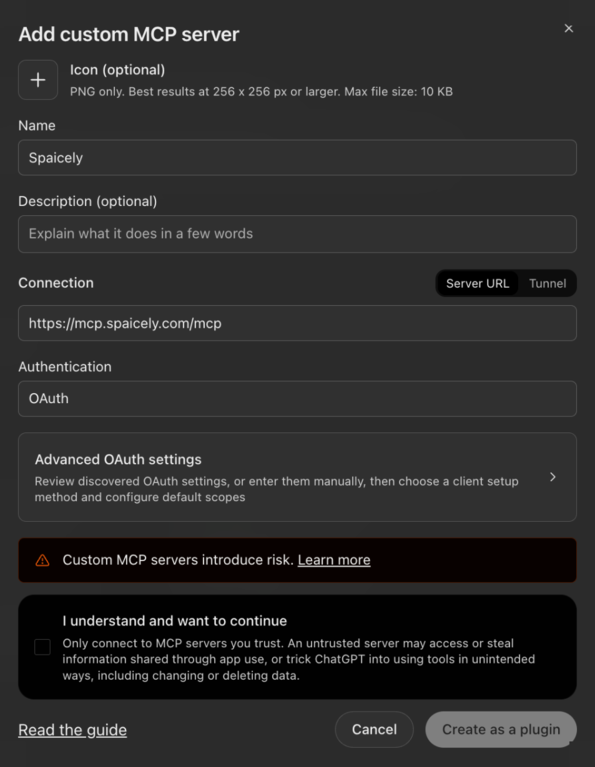
Under Name, enter Spaicely. You can leave the icon and the description empty.
-
Under Connection, keep Server URL selected and enter this address:
https://mcp.spaicely.com/mcp -
Under Authentication, choose OAuth if it is not there already. Leave the advanced OAuth settings closed: ChatGPT fetches them from Spaicely itself.
-
Tick I understand and want to continue, then click Create as a plugin. ChatGPT sends you to Spaicely: sign in, tick the companies and sites it may work for and allow it.
-
Start a new chat, type @ in the message box and choose Spaicely.
If ChatGPT does not know something new in Spaicely yet, open Spaicely on chatgpt.com/plugins and click Refresh.
Daarna bij Spaicely
Na de laatste stap opent ChatGPT een pagina van Spaicely. Heb je al een account, dan log je in; zo niet, dan maak je het daar aan met je e-mailadres. Daarna vink je aan waar ChatGPT mag werken en klik je op Toestaan. Dan is de koppeling klaar.
Log je eerst in, dan ziet deze pagina vanzelf wanneer de koppeling gelukt is.
Free ChatGPT or ChatGPT Go
Without a paid plan ChatGPT cannot reach Spaicely itself. It can still make your site as files, and you put them online in a few clicks. Every change then goes through you: ChatGPT does not see what is live.
-
Copy this request into ChatGPT and fill in the parts in brackets:
Build a complete static website for [name of your business]: [what you do, for whom and where].
The site will live at [your domain, for example jonesbakery.co.uk]. My host only serves files, so use only HTML, CSS and JavaScript: no PHP, no database and no build step.
Include:
- index.html at the root and a 404.html in the same style
- on every page its own title, meta description, lang, canonical link and Open Graph tags, with full https addresses on my domain
- robots.txt, sitemap.xml, llms.txt and a favicon at the root
- JSON-LD that describes my business
- relative links between the pages
Photos you cannot make yourself: leave the space open and give the file name, and I will put my own photo there.
Put all files in one zip with index.html at the root and give me the download link. If a zip does not work, give me each file separately with its path above it.
-
Download the zip. If ChatGPT gives separate files, save them all in one folder, with the subfolders it names.
-
Sign in at app.spaicely.com, make a site under Sites with New site, and choose a plan or the test month: then you can upload.
-
Drop the zip or the folder on the site page and tick Put it live at once.
-
To change something, ask ChatGPT in the same chat for the whole zip again and upload it. Spaicely keeps every version, so you can always go back.